Coming soon

Coming soon

Coming soon

Excel-Handling

If your sales team spends more time in Excel than with customers, something's broken.

If your sales team spends more time in Excel than with customers, something's broken.

The problem

Your team receives RFQs as Excel files — different formats, thousands of lines, every customer their own structure. Matching, splitting, merging, reformatting: hours of work before you can send a price.

Your solution

With Distrify, the same process takes minutes.


Upload any Excel, match and price automatically, send supplier requests with one click, export in your customer's format. Quote more, faster.

Operating System not recognized.

What takes hours,
done in minutes.

What takes hours,
done in minutes.

What takes hours,
done in minutes.

Typical case: Customer sends 8,000 parts. You quote 500 and send an offer, in under 10 minutes.

Typical case: Customer sends 8,000 parts. You quote 500 and send an offer, in under 10 minutes.

Distrify and OEMSecrets partnership logos with electronic component connector illustration

Let's break it down.

Distrify and OEMSecrets partnership logos with electronic component connector illustration

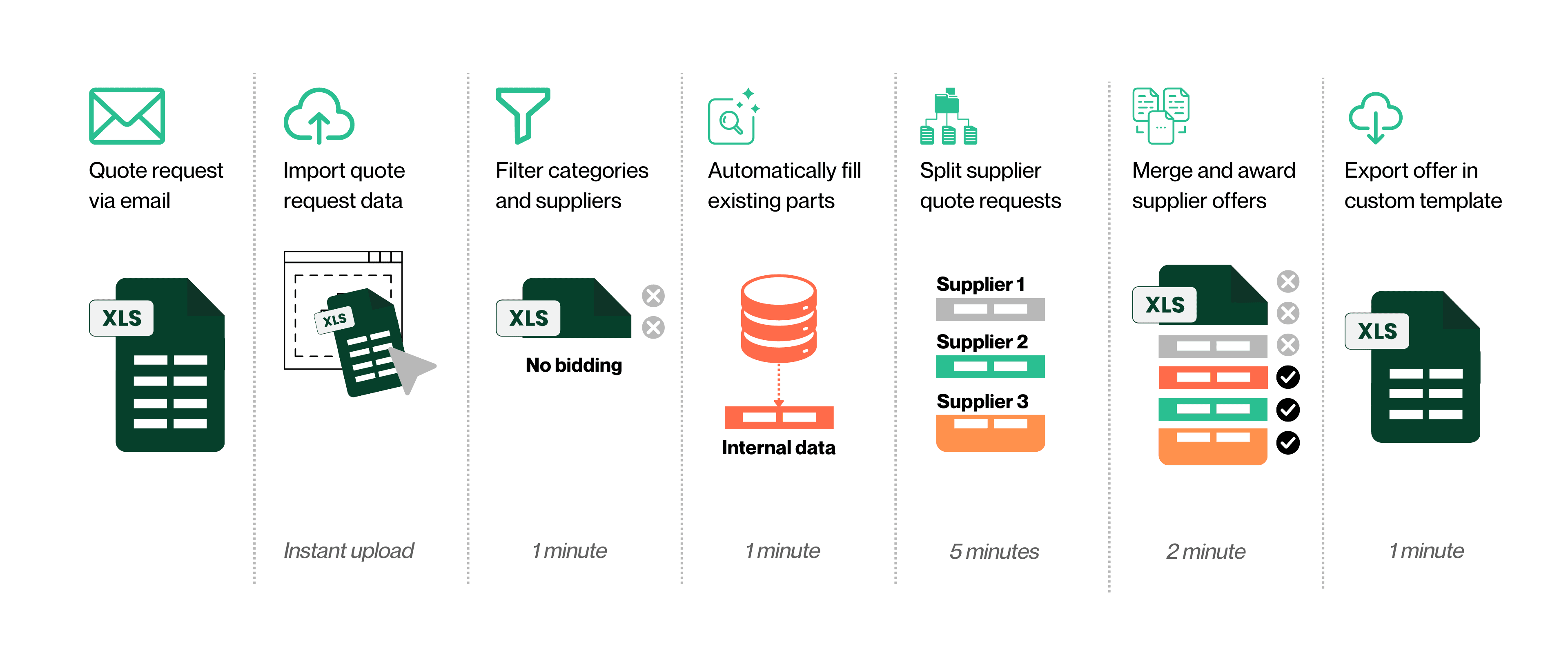
Import the Excel with easy drag and drop

Customer sends an RFQ with thousands of parts in their format? Upload it directly. Distrify auto-maps columns and enriches part data — no reformatting, no copy-pasting.

Filter out no-bids and fill your inventory

Filter out parts you won't bid on and focus on winnable lines. For the rest, Distrify matches your stock, checks availability, and applies pricing — no manual lookups, no VLOOKUP.

Split supplier Excels and merge offers

Generate one ready-to-send Excel per supplier. When quotes come back, import and compare side-by-side. Award best prices and merge into your master quote.

Export offer in custom template

Every customer wants quotes their way. Set up templates once, then export with one click — right columns, right layout, no manual reformatting for every quote.

Ready to see this live?

Watch how Distrify turns your data
into live APIs and digital sales channels.
Click on the video below to request access.

FAQ

FAQ

FAQ

Here are the answers to your questions

Here are the answers to your questions

Explore the most frequently asked questions.

Can Distrify handle any Excel format?

Yes. Distrify automatically maps columns regardless of structure or format. No manual reformatting required.

Can Distrify handle any Excel format?

Yes. Distrify automatically maps columns regardless of structure or format. No manual reformatting required.

Can Distrify handle any Excel format?

Yes. Distrify automatically maps columns regardless of structure or format. No manual reformatting required.

How does automatic matching work?

Distrify matches uploaded parts against your inventory and supplier catalogs, then applies your pricing rules automatically.

How does automatic matching work?

Distrify matches uploaded parts against your inventory and supplier catalogs, then applies your pricing rules automatically.

How does automatic matching work?

Distrify matches uploaded parts against your inventory and supplier catalogs, then applies your pricing rules automatically.

What if I need to send quotes in my customer's specific format?

Set up customer templates once, then export quotes with one click in the exact format they require.

What if I need to send quotes in my customer's specific format?

Set up customer templates once, then export quotes with one click in the exact format they require.

What if I need to send quotes in my customer's specific format?

Set up customer templates once, then export quotes with one click in the exact format they require.

Can I split large RFQs for multiple suppliers?

Absolutely. Generate one ready-to-send Excel per supplier, then merge quotes back when they respond.

Can I split large RFQs for multiple suppliers?

Absolutely. Generate one ready-to-send Excel per supplier, then merge quotes back when they respond.

Can I split large RFQs for multiple suppliers?

Absolutely. Generate one ready-to-send Excel per supplier, then merge quotes back when they respond.

How much faster is this compared to manual Excel work?

What typically takes hours is done in minutes. For example, quoting 500 parts from an 8,000-line RFQ takes under 10 minutes.

How much faster is this compared to manual Excel work?

What typically takes hours is done in minutes. For example, quoting 500 parts from an 8,000-line RFQ takes under 10 minutes.

How much faster is this compared to manual Excel work?

What typically takes hours is done in minutes. For example, quoting 500 parts from an 8,000-line RFQ takes under 10 minutes.